Sources
Sources is where you add and monitor indexed video. Start here when you need to confirm that footage is ready before using Search moment, Ask Composer, or a generation tool.
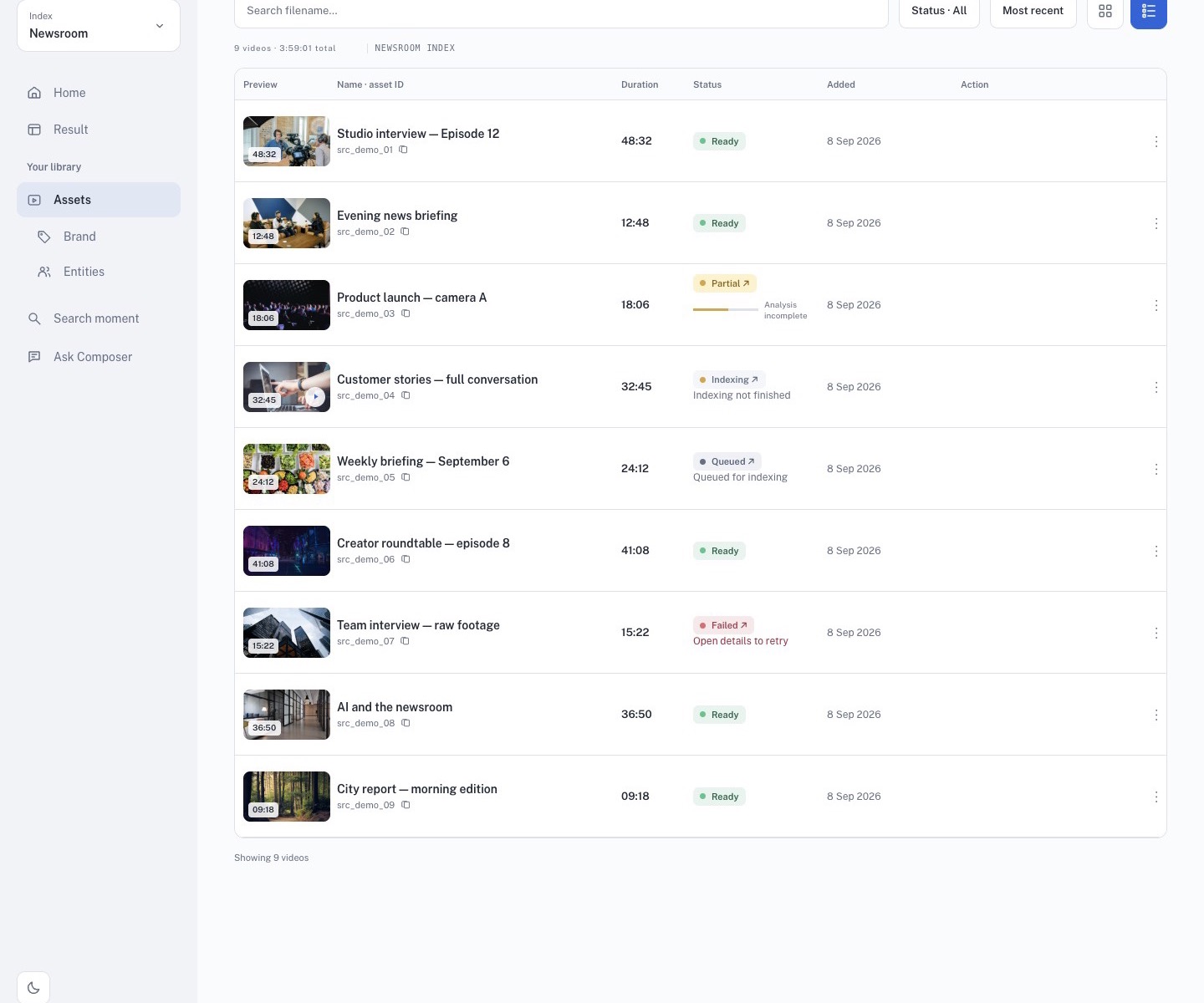
Read the library
The current Sources surface shows:
- the source title and asset ID;
- duration and poster preview;
- processing status such as Ready, Indexing, Queued, or Failed;
- the date added and a row action menu.
Use the search field, status filter, sort control, and grid/list toggle to narrow the library. A playable poster does not prove that indexing is complete.
Check readiness
- Confirm the active index in the sidebar.
- Wait for the source to show Ready before relying on Search or Ask.
- Use Refresh when a background job has just finished.
- Open the row menu for source-specific actions.
The action list depends on the source state and workspace permissions. Common actions include opening a source in Search or Ask Composer, creating highlights, generating an MBM, downloading a transcript, and deleting an asset. Read the confirmation carefully before deleting anything.
Upload responsibly
Upload only footage you are allowed to process. Use a meaningful filename and keep the asset ID and page URL when reporting a problem. If a source stays in Indexing, Queued, or Failed, wait for the job or ask a workspace administrator to inspect it before starting duplicate uploads.
Public screenshots in this guide use the neutral demo UI. Do not publish customer source names, private footage, or account details in public documentation.